
Run it from the AI you already use.
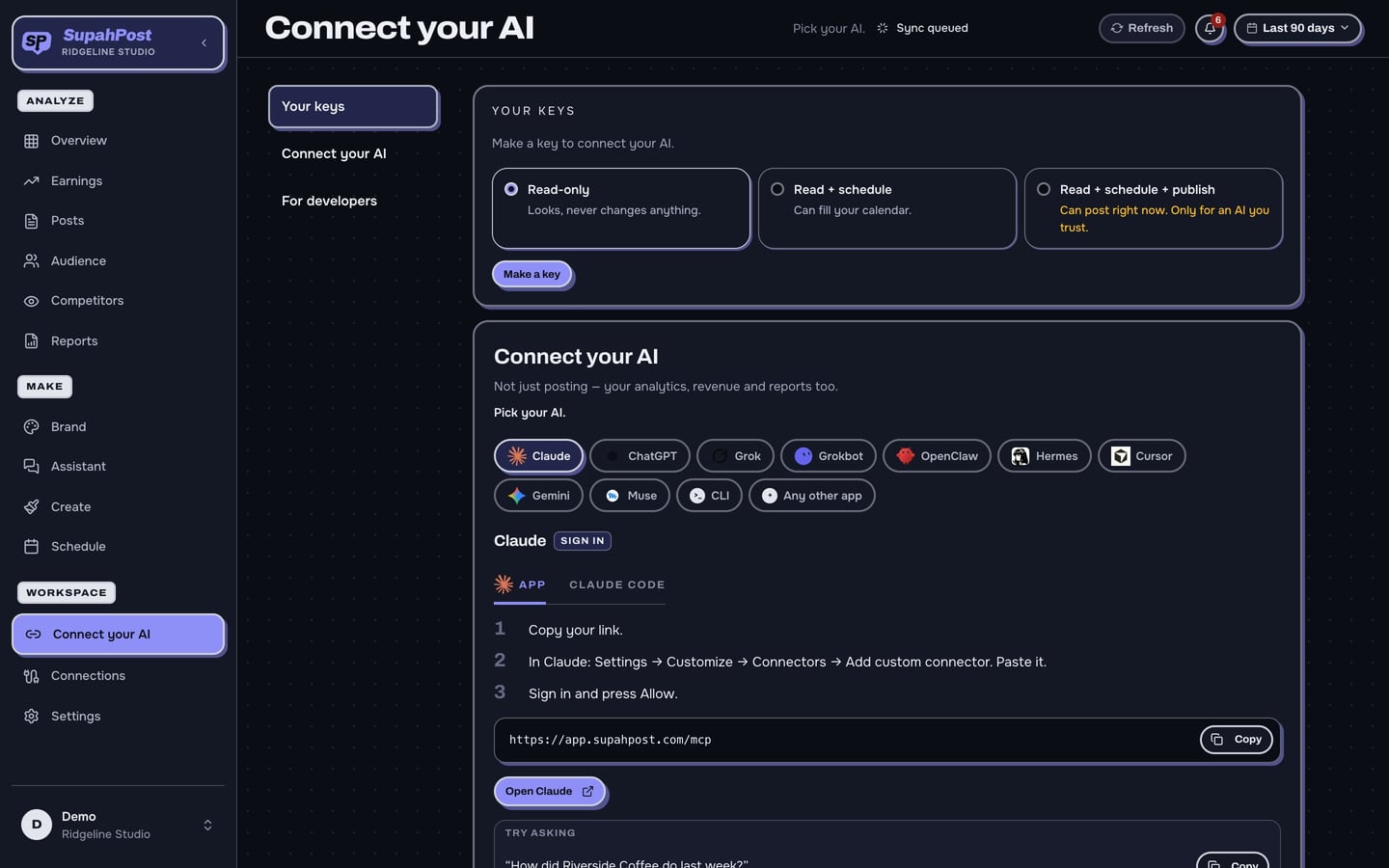
SupahPost has its own MCP server, the standard way AI apps connect to other tools. Paste one link into Claude, ChatGPT or Grok and your AI can read your numbers, make posts, fill your calendar and build reports. You choose what it is allowed to do.
7-day free trial · $0 due today · cancel anytime










Plus Claude Code, our own command-line tool, and any other app that can connect by link.
What is MCP?
MCP (Model Context Protocol) lets an AI app use other software for you. Without it, your AI can only guess about your accounts. With it, your AI works from your real posts and numbers.
tools for your AI
Everything from reading a post's numbers to building a carousel.
link to paste
Copy it from Settings and add it to your AI app. That is the whole setup.
extra
Included on every plan. Reading your own data is never billed.
What your AI can do.
Ask in plain English. It does the clicking.
Answer questions about your accounts
It reads your real views, followers, earnings and comments.
Make posts in your brand
Graphics, carousels and captions, built from your own templates.
Fill and fix your calendar
It places drafts in your best times, and moves or edits what is queued.
Build your reports
A client-ready deck from one request, in four file formats.
It works from your data.
Because your AI is connected to your workspace, its answers come from your posts, not from general advice.
You decide what it can touch.
Pick a level when you connect, and change it any time. Publishing and replying to comments always show you a preview first.
One workspace, and only yours.
Each connection belongs to a single workspace. Your AI can never see anyone else's accounts, or your other workspaces.
Connected to: Bench Street
This link reaches this workspace only
Access: Fill the calendar
Change or remove it any time
Connected in three steps.
Copy your link
Open Settings, then Connections, then Your AI.
Paste it into your AI app
Add it as a connector in Claude, ChatGPT, Grok or whichever app you use.
Ask for something
Start with a question about last week's posts.
Want the whole list?
Every kind of thing your AI can do in SupahPost, grouped by job.
See everything your AI can do →Your AI, answered.
What is MCP?
MCP (Model Context Protocol) is the standard way AI apps connect to other tools. SupahPost has its own MCP server, so your AI can work with your real accounts and numbers.
Which AI apps work?
Claude, ChatGPT, Grok, Cursor, Muse, OpenClaw, Hermes, Grokbot, Gemini, Gemini CLI and Claude Code, plus any other app that can connect by link.
Does it cost extra?
No. It is included on every plan, and reading your own data is never billed.
Can my AI post without me?
Only if you allow publishing, and it shows you a preview first. You can also keep it to looking, or to filling the calendar.
Can it see my other workspaces?
No. Each connection belongs to one workspace and can never reach another.
Bring your own AI.
Included on every plan.
Start free →7-day free trial · $0 due today · cancel anytime